
Get My P45 Sorted: Lost Your P45? Here's Exactly How to Get Your Details
Typing "get my P45" into a search bar usually means one thing: you need it for a new job, a tax refund, or a benefits claim, and the original has gone missing. The reassuring part is that a lost P45 is one of the easier payroll problems to fix once you know where to look. This guide covers every legitimate route to help you retrieve your details, in order of speed, plus what to do if none of them work.
Note: Need your Payslips, P60, or P45 urgently and can't afford to wait for a standard replacement request through your employer or HMRC? A2Z Payroll Services can fast-track the process. Visit: A2Z Payroll Services to Request your Documents. Your documents arrive within 2 hours. With more than 20 years' experience as a trusted payroll service provider, A2Z Payroll Services supplies the original documents — never fabricated copies like some other online services offer.
P45 Basics: What You're Actually Trying to Recover
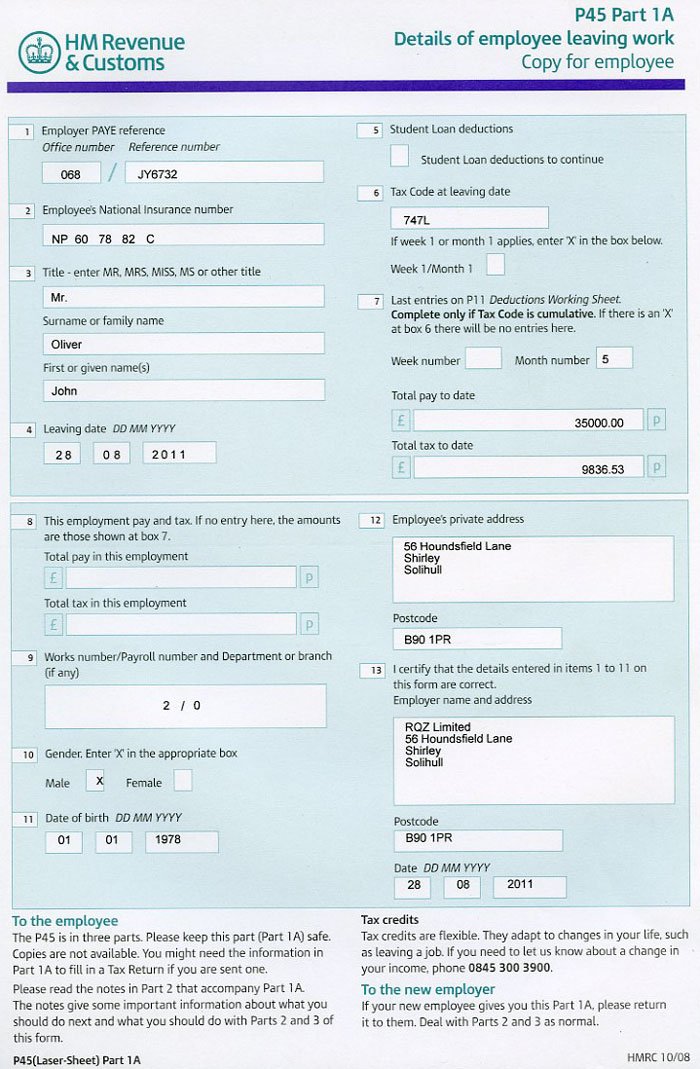
A P45 is a four-part form your employer produces the moment you leave a job. It isn't a generic certificate — it's built from that specific employer's payroll records and shows your tax code, your total pay, and the tax you'd paid up to your leaving date.
Why This Matters When You Try to Get Your P45 Back
Because a P45 is generated from one employer's payroll data at one point in time, nobody can simply "look it up" and hand you an identical copy the way you might reprint a bank statement. That's the single biggest misconception people have when they set out to replace a lost P45 — and it's exactly why the routes below focus on getting the same information, rather than a reissued physical form.
What Is a P45 Used For?
- Giving your new employer the details to set your tax code correctly
- Claiming a UK tax refund if you've overpaid
- Applying for Jobseeker's Allowance or other benefits
- Completing a Self Assessment tax return
A Quick Reality Check
If you just need to get P45 information for a new job and time is tight, skip ahead to the Starter Checklist section below — it's the fastest practical workaround and it's built for exactly this situation.
The Fastest Routes to Get Your Details Back
| Route | Typical Speed | Best For |
|---|---|---|
| Former employer / payroll team | 1–5 working days | Getting an exact statement of earnings |
| HMRC Personal Tax Account | Instant | Checking pay, tax, and tax code yourself |
| HMRC app | Instant | Same as above, from your phone |
| HMRC by phone/post | Days to weeks | Employer no longer trading |
| Starter Checklist (new employer) | Immediate | Starting a job without a P45 at all |
1. Go Back to the Employer Who Issued It
This is still the most direct way to get your documentation sorted out. If you have left a position and were never given a form, you should ask your previous employer directly. While they cannot print a second identical copy once a P45 is lost, most payroll departments can easily issue an alternative “statement of earnings” covering the exact same figures.
2. Use Your HMRC Personal Tax Account
Your Personal Tax Account pulls directly from HMRC's own records of your pay and tax. This is often the best backup option when you need to view your income figures within minutes rather than waiting on an employer's payroll team.
3. Check the HMRC App
The HMRC app gives you the same income and tax data as the Personal Tax Account in a mobile-friendly format — handy if you're trying to track down your tax information while you're out and about, not sat at a desk.
4. Contact HMRC Directly
If the employer has closed down or simply isn't responding, HMRC can tell you what pay and tax figures they have on file for that employment.
For the official explanation of P45s and what to do if yours is missing, see HMRC's P45 guidance on gov.uk.
No Luck? Here's What Still Works
Use a Starter Checklist Instead of Chasing the Old P45
If you're short on time and a new employer needs details from you, the Starter Checklist is a built-in HMRC alternative. It completely replaces the need to track down a physical document before your first payday, letting payroll set a correct tax code from your answers instead.
Fall Back on a P60 or Payslips
A P60 (issued every April by an employer you're still with) or your last few payslips often contain the same tax code and year-to-date pay figures you'd otherwise get from a P45.
Note: Didn't find the answer you were after in this guide? Head over to our main Get Your P45 landing page, where you'll discover further options and our complete Get You P45 Guide.
Tip for Future Job Changes
Once you do manage to get your payroll details sorted this time, save a digital copy — a phone photo is fine — so the next job change doesn't send you back to square one.
What's Actually Printed on a P45?
- Your name, address, and National Insurance number
- Employer PAYE reference
- Your tax code and leaving date
- Total pay and tax deducted in that tax year up to leaving
- Student loan deduction status, if relevant
Note: This post complements our separate article covering general payslip recovery. For broader options, read our comprehensive Lost Payslips guide instead.
Frequently Asked Questions
Can I get my P45 online instantly?
Not as a literally reissued form, but your HMRC Personal Tax Account shows the same core figures — pay, tax paid, and tax code — almost immediately, which covers most of what people actually need a P45 for.
What if my old employer has closed down, then how do I get my P45?
Contact HMRC directly. They can confirm what pay and tax information they hold for that employment even if the original employer is no longer trading.
Do I need a P45 to start a new job?
No. If you can't get your P45 in time, a new employer can use HMRC's Starter Checklist instead to work out your tax code correctly.
Is losing a P45 a serious problem?
Not usually. It's inconvenient rather than urgent, since the figures it contains can be recovered from your employer's payroll records or HMRC's own systems.
How long does it take to get a replacement for a lost P45?
It depends on the route. A former employer usually responds within a few working days, while an HMRC Personal Tax Account or the HMRC app can show the same figures almost instantly.
Conclusion
Losing a P45 rarely turns into a real problem as long as you know the right order to try things in. Start with the employer who issued it, use your HMRC Personal Tax Account or app as a fast backup, and lean on a Starter Checklist if a new job can't wait. Between those three options, almost everyone can get their income details back — or something HMRC and employers accept in its place — within a few days at most.