
Get My P45: How to Replace a Lost P45 Form
If you've searched “get my P45” because you've lost the one your old employer gave you, you're not alone — it's one of the most common payroll questions in the UK. The good news is that even though HMRC won't reissue a P45 directly, there are several straightforward ways to get the information you need. This guide walks through exactly what a P45 is, why you might need to get your P45 again, and every realistic route to sorting it out quickly.
Note: Need your Payslips, P60, or P45 urgently and can't afford to wait for a standard replacement request through your employer or HMRC? A2Z Payroll Services can fast-track the process. Visit: A2Z Payroll Services to Request your Documents. Your documents arrive within 2 hours for a small fee. With more than 20 years' experience as a trusted payroll service provider, A2Z Payroll Services supplies the original documents — never fabricated copies like some other online services offer.
What Is a P45 and Why Does It Matter?
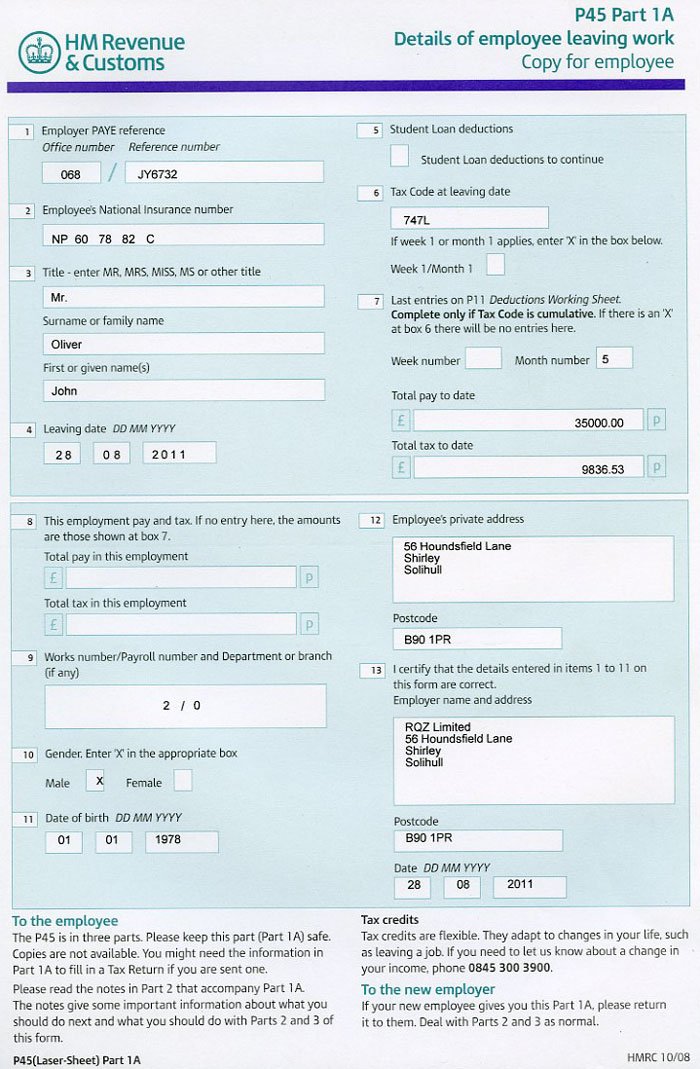
A P45 is the official document your employer gives you when you leave a job. It shows your tax code, your total pay and tax paid so far in the tax year, and your leaving date. New employers use it to set up your tax correctly, and it's also handy for claiming tax refunds, applying for benefits, or filling in a Self Assessment return.
Who Issues a P45?
Only your employer can issue a P45 — HMRC doesn't create or hold a copy in the traditional paper sense, though your pay and tax details are still recorded on HMRC's systems. That distinction matters a lot when you're trying to get your P45 back after losing it, because it shapes which route will actually work.
Why People Search “Get My P45”
Typical scenarios include:
- Misplacing the physical document after moving house
- Starting a new job and being asked for a P45 you never kept
- Needing proof of income and tax paid for a mortgage or benefits application
- Losing paperwork during a job change or redundancy
Step-by-Step: How to Get Your P45 After Losing It
1. Contact Your Former Employer First
The fastest way to get your P45 sorted is usually the simplest: ask the payroll or HR department of the company you left. Employers are required to keep payroll records for at least three years, so even if they can't reissue an identical P45 form, they can usually provide a “statement of earnings” that contains the same figures — total pay, tax deducted, and tax code — which most new employers and HMRC will accept.
2. Check Your HMRC Personal Tax Account
If your former employer is unresponsive, has closed down, or you'd rather not chase them, your Personal Tax Account lets you check income tax estimates and tax codes directly through HMRC's own systems. This won't hand you a literal P45-shaped PDF, but it gives you the underlying pay and tax figures, which is what actually matters for most purposes.
You can access your Personal Tax Account here: HMRC Personal Tax Account.
3. Use the HMRC App
The HMRC app mirrors much of the Personal Tax Account and is a quick way to check your income and tax details on your phone. It's worth trying this route if you need to get your P45 details on the go rather than sitting down at a computer.
4. Ask HMRC Directly
If your employer can't help — for example, if the business has closed — you can contact HMRC directly and they can tell you what pay and tax information they hold for that employment, even though they won't produce a P45-format document themselves.
Full guidance on P45s, including what to do if you don't have one, is available directly from HMRC here: gov.uk P45 guidance.
Can HMRC Reissue a P45?
This is the part that surprises a lot of people trying to get their P45 replaced: HMRC does not reissue P45s. A P45 is generated by an employer's payroll software at the point someone leaves, and it isn't stored centrally as a document HMRC can simply print again. What HMRC does hold is the underlying pay and tax data, which is why the Personal Tax Account route above is usually the most reliable official alternative when the original form is gone for good.
Note: If you have not found answer to your question, then explore our dedicated Get your P45 page, with additional options comprehensive Get Your P45 Guide.
What to Do If You Genuinely Can't Get Your P45 Back
Fill In a Starter Checklist Instead
If a new employer needs information from you and there's no P45 available, they can use HMRC's Starter Checklist instead. This form asks about your employment history and any other income, and it lets payroll set an appropriate tax code without needing the original P45 at all.
You can find the official Starter Checklist here: HMRC Starter Checklist for new employees.
Keep a Record for Next Time
Once you do manage to get your P45 sorted — whether from the employer or via HMRC's records — it's worth saving a digital copy (a scan or photo) somewhere safe, so you're not repeating this process the next time you change jobs.
What Information Is Actually on my P45?
A standard P45 is split into four parts and includes:
- Your name, address, and National Insurance number
- Your tax code and PAYE reference
- Your leaving date
- Total pay and tax deducted in the current tax year up to your leaving date
- Student loan deduction details, if applicable
How Long Does It Take to Get Your P45 Details Back?
Timing depends entirely on the route you take:
- Former employer: Usually a few working days, depending on how quickly their payroll team responds.
- Personal Tax Account or HMRC app: Often instant, since the data is already on record.
- HMRC by phone or post: Can take longer, particularly by post, so it's worth trying digital options first if you're in a hurry to get your P45 information sorted.
Frequently Asked Questions
Can I get my P45 online instantly?
Not as a literal reissued form, but your Personal Tax Account gives you the same core figures (pay, tax, tax code) almost immediately.
How do I get my p45 if my old employer has closed down?
Contact HMRC directly — they can confirm what pay and tax information they hold for that employment even without the original employer involved.
Do I need a P45 to start a new job?
No. A Starter Checklist covers the same purpose if you can't get your P45 in time, and most employers are used to processing new starters this way.
Is losing a P45 a serious problem?
Not usually — it's inconvenient rather than urgent, since the tax figures it contains are recoverable through your employer or HMRC's own records.
Note: This post complements our separate article covering general payslip recovery. For broader options, read our comprehensive Lost Payslips guide instead.
Conclusion
Losing a P45 feels stressful in the moment, but it's rarely a dead end. Whether you go back to your former employer, log into your Personal Tax Account, or fall back on a Starter Checklist with your new employer, there's always a practical way to get your P45 details sorted without unnecessary delay. Start with the employer who issued it, and use HMRC's own digital tools as your backup — between the two, you should have everything you need in hand within a few days at most.